The rest of the game is covered in the Foundation: Galactic Frontier hub. This page only deals with playing on a computer. Facts come from the Steam store and the developers' Steam news posts, the official site, the App Store listing and the October 2025 launch press release.
Three ways to play on a computer
| Option | Available | Notes |
|---|---|---|
| Official Windows launcher | Since 21 October 2025 | Download from the Windows button on foundation.game; FunPlus's own installer |
| Steam | Scheduled for 6 November 2026 | Free to play; store page live since January 2026; launch rewards (below) |
| Mac (App Store) | Live | Runs on Macs with an Apple M1 chip or newer and macOS 12 or later |
| Android emulator | Possible | Unnecessary now that a native client exists; the official clients are the safer choice |
Our recommendation: if you already play through the official launcher, there is no need to switch. If you are new, Steam is the convenient choice from 6 November because of the launch rewards and Steam's own update handling. Either way, your account and progress are the same.
The Steam version (6 November 2026)
The timeline on Steam: on 15 January 2026 the developers announced the Steam store page and a 2026 release; on 30 October 2026 they set the launch for 6 November 2026. The game also took part in Steam Next Fest in October 2026, per Inven Global. Some news sites reported in October that the game was "now available" on Steam; on the day we checked (3 November 2026), the store still showed "Coming soon", so trust the official date.
Steam store facts: free to play, developer and publisher FunPlus International AG, genres Strategy, MMO, RPG, Simulation and Adventure, categories including PvP, online co op, cross platform multiplayer and in app purchases, and 21 languages with full audio, from English, German, French and Polish to Japanese and Korean.
Steam launch rewards (official)
- Demerzel Star Flagship for logging in 8 days. Its R1 ability, Tactical Oppression, reduces enemy Attack and Intelligence.
- Project Daybreak power rush event with extra flagship rewards and flagship blueprints in the ranking rewards.
- Governor Zora Domini (SSR Kinetic damage) with your first purchase.
- Warden (SSR Kinetic support) from an 8 day event.
- Cocoon (SSR Kinetic defense) through recruitment items from early quests.
Those three champions form the Kinetic fleet the developers recommend. How to run it is on our ships and flagships page.
 Foundation: Galactic Frontier: 1st Anniversary Gala (official channel)
Timing tip. The Steam launch lands right at the end of the first anniversary. The Astral Alignment festival runs until 7 November 2026 on server 1264 and all older servers, and the Returning Friend event until 30 November. A returning player who comes back through Steam in November can therefore stack the Steam login rewards, the last anniversary day and the returning tasks. New players should simply start on the newest server the game offers, where everyone begins together and the Border Regions are still open.
System requirements
| Component | Minimum (Steam store) |
|---|---|
| OS | Windows 7 SP1 or newer, 64 bit |
| Processor | Intel Core 2 Duo E6400 or AMD Athlon x64 4000+ |
| Memory | 4 GB RAM |
| Graphics | Nvidia GeForce GTX 460 or Radeon HD 4400 or better |
| DirectX | Version 10 |
| Network | Broadband internet connection |
| Storage | 8 GB available space |
The recommended spec on Steam only says a 64 bit processor and operating system are required; no recommended hardware is listed, so we do not invent one. In practice the minimum is very low for 2026 hardware. Large guild battles with many fleets on screen are the heaviest scenes, so a modern mid range PC is comfortable. For comparison, the iOS app is about 4 GB.
Moving your phone account to PC

- On your phone, bind the account: Settings, then Account. The official 10 tips guide recommends this for security and cross platform play.
- Install the PC client: Steam from 6 November, or the official launcher from foundation.game.
- Log in with the same bound account on PC. Do not start a new trader on the PC server first.
- Check your server and guild on the profile screen before you play.
- Keep the phone installed. The official FAQ says you can switch freely between desktop and mobile with synced progress.
Languages, audio and other platforms
Steam lists 21 languages, all with full audio: English, French, Italian, German, Spanish (Spain and Latin America), Russian, Indonesian, Turkish, Polish, Thai, Swedish, Dutch, Portuguese (Brazil and Portugal), Vietnamese, Malay, Simplified and Traditional Chinese, Japanese and Korean. Japanese and Korean were added to the game in March 2026 (update 1.1.0). You can change the language in the game settings without reinstalling.
Besides Windows and Mac, the App Store lists iPhone and iPad (iOS and iPadOS 13 or later) and Apple Vision (visionOS 1.0 or later), and the game is on Google Play for Android. Android received optional Vulkan rendering in update 1.1.188. All of these share the same account and servers.
Launcher or Steam?
Both run the same game on the same servers. The official launcher is the original PC client and is available today. Steam adds its overlay, friends list and automatic updates, plus the launch rewards listed above. We found no official statement that the two clients differ in content or performance, so choose by convenience, and do not install both just to claim rewards twice on one account.
Checklist before the Steam launch
- Bind your current account on every device you use.
- Add the game to your Steam library or wishlist so the client is ready on 6 November.
- Note your server number and guild, so you can confirm you logged in to the right account.
- Plan the 8 day login for Demerzel: missing a day delays the flagship.
- Free 8 GB of disk space plus room for updates.
What we could not confirm
We found no official statement on controller support, Steam Deck compatibility, Steam achievements or a recommended (not minimum) hardware spec. We also found no official size for the launcher download. We will add these once the Steam version is live and the developers publish them; until then, treat claims about them on other sites with care.
Why PC is better for this game
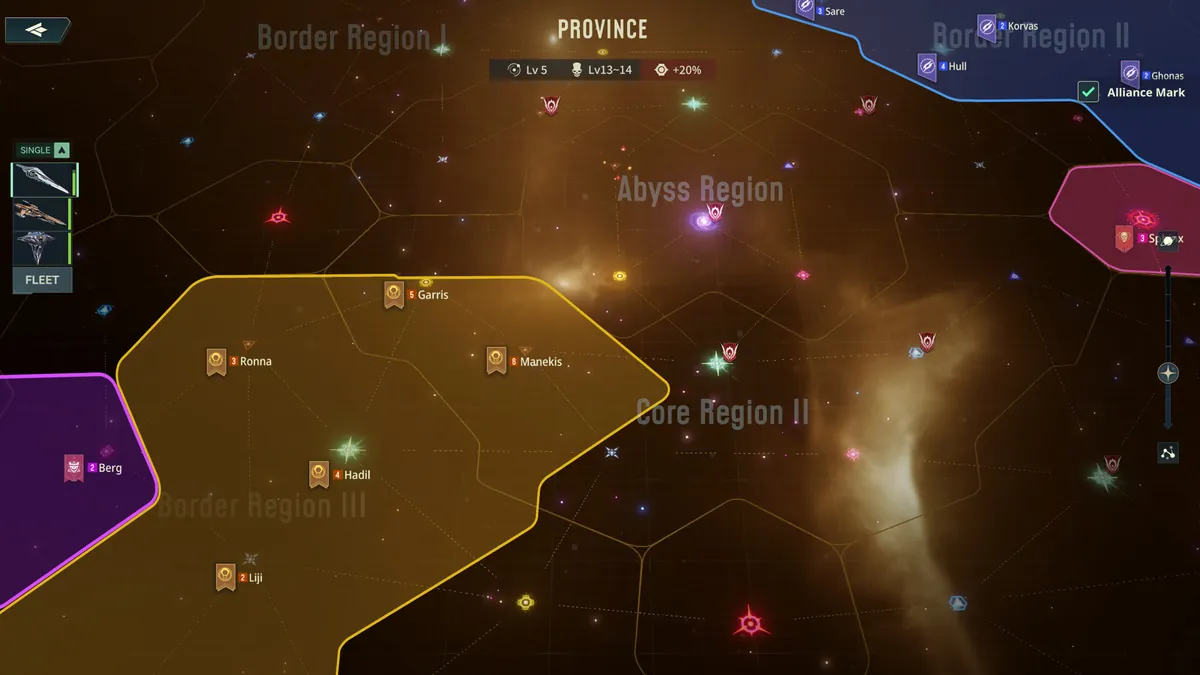
- The map. Port wars, rallies and exploration all happen on the star map. A big screen shows more systems and fleets at once.
- Keyboard shortcuts. Update 1.1.154 (September 2026) added keyboard shortcuts, which make queue management much faster.
- Guild coordination. Many guilds coordinate on Discord, which is easier to run next to the game on a desktop.
- Ground combat. Third person landings are easier to aim with a mouse.
The phone stays useful for collecting resources, quick rallies and Trader Commissions between sessions. Start with our beginner guide if you are new, and read the PvP and alliances guide before your first port war.

FAQ
Is Foundation: Galactic Frontier on PC?
Yes. A Windows client has been available since the global launch on 21 October 2025 through the official launcher on foundation.game, and the Steam version is scheduled for 6 November 2026.
When does Foundation: Galactic Frontier release on Steam?
The developers announced on 30 October 2026 that the Steam launch is on 6 November 2026. The Steam app id is 4223760.
What are the PC system requirements?
Steam lists 64 bit Windows 7 SP1 or newer, an Intel Core 2 Duo E6400 or AMD Athlon x64 4000+, 4 GB RAM, a GeForce GTX 460 or Radeon HD 4400, DirectX 10 and 8 GB of storage.
Can I play my mobile account on PC?
Yes. Bind the account in Settings, then Account on your phone and log in with it on PC. The official FAQ confirms shared progress across Windows, iOS, Android and macOS.
Is there a Mac version?
Yes, through the App Store. Apple lists macOS 12 or later and a Mac with an Apple M1 chip or newer.
What do I get for playing on Steam at launch?
The Steam launch post promises the Demerzel Star Flagship for 8 days of login, Zora Domini with the first purchase, Warden from an 8 day event and Cocoon through early quest recruitment items.